TF Chapter 1: Terraform Basic
Chapter 1: Terraform Basic
A. Concept
Terraform is a HCL (Hashicorp Configuration Language) - It’s a language formed by Hashicorp to define infrastructure configuration in a readable, maintainable, and predictable way. It is not a programming language, although it has some unique logics you can play around to make the configuration more dynamic.
The style of Terraform HCL can be defined as follow:
- Declarative: Your infrastructures are defined by declaring your components and describing your desired state of the infrastructure’s configuration.
- Block-based Structure: Any requirements for your configurations are defined as blocks built of keyword (block type), identifier (block label), and body (configurations defined within the curly braces {})
- Configuration-focused: Your code describes the desired end result of your infrastructure by defining the values for your infrastructure’s properties.
Terraform functions by scanning .tf files in the current working directory, which will read all the blocks provided in every .tf files and translate it into a CRUD request to the target infrastructure (using defined providers - esentially a plugin to connect to your target infrastructure) based on which commands are being fed. The result of the terraform CRUD will be recorded on a state file which can be saved on your local directory or can also be maintained remotely.
B. Workflow and Basic CLI command
The workflow of a terraform ecosystem can be illustrated as follow: 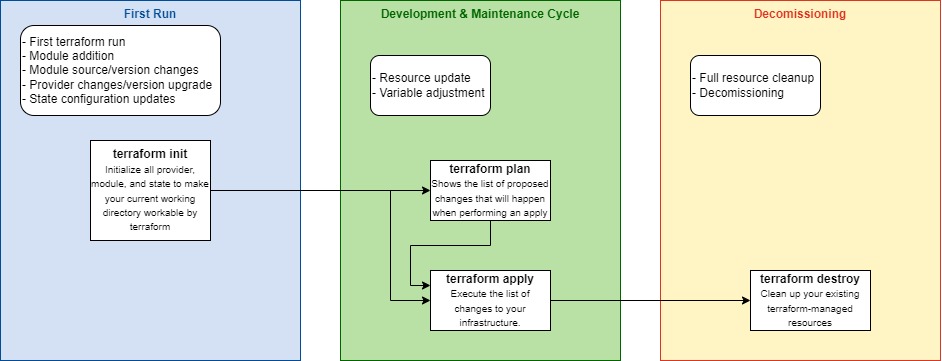 Every time you started working on a fresh terraform directory, you will need to initialize the code using
terraform init. It will load all provider, module, and state required to allow your current working directory to be used by terraform for performing changes to your infrastructure. Initialization is required for every first run, on module addition, module source/version changes, provider changes or version upgrades, and also on state configuration updates. Other than that, it is not necessary to perform an init to the directory.
Once you initialize the directory, you might want to see what kind of changes terraform will perform to your current terraform code. That is when terraform plan command might be handy, which will perform a dry run toward your current terraform code, comparing your terraform configuration with your current running infrastructure, checking for all create/update/delete changes based on the comparison. As this is a dry run, no actual update is done to the actual state file; Your next command (apply/refresh) will be the one doing the changes. This step is not obligatory but it is still a good practice to check your changes beforehand.
If you are sure to execute the proposed change after the dry run, you can do so by running terraform apply to your current working directory. It will once again perform the dry run check and ask you to confirm the changes (unless explicitly skipped via --auto-approve flag). Once you confirmed the change, it will perform a series of API call to create the infrastructure via your defined provider.
Now that you have created and maintained your infrastructure on Terraform, there are occurence where you will need to perform a full decomission of your infrastructure, whether it is to clean up your lab or if there were some post-migration activities which has made your running terraform-managed infrastructure unused. To do so, you can use the command terraform destroy which read your terraform state, match it with the one running in your infrastructure, then clean up all resources based on what has been read & matched to from your state. A resource not defined on terraform state will not be destroyed, and a resource saved on your state but not existing in your infrastructure won’t cause issue to the destroy command. It is essentially a nuke button, so be careful on performing this action on your production environment.
C. Basic Blocks
There are several basic blocks that is used by Terraform to define your configurations, which are as follow:
Variable Block
1
2
3
4
5
variable "instance_type"{
	default = "a string"
	type = string
	...
}
This block is used to define the list of variables required for your terraform configuration. The value of the variable will be defined in either module block values or in tfvars file based on where the variable block is defined at. If no default value were defined, you are required to set the value. You can access the value defined in .tfvars by calling var.variable_name
Data Block
1
2
3
data "aws_instance" "that_instance"{
	...
}
This block is used to make reference points to the current configurations of an existing resource that is exposed by the provider’s API. It will not attempt to manage the resource’s configuration and will only do a read/get request to the provider. The content of the block will revolves around targeting/selection of the resource that exist in your infrastructure.
Local Block
1
2
3
4
5
locals {
	value1 = "this-value"
	value2 = "${var.env}-${var.app_name}"
	...
}
This block is similar to a .tfvars file, which is used to define a key-value informations like a variable that is accessible by .tf files in the same directory. It is designed to define values that are repetitive within the block or computed values based on logical expressions or terraform functions, or defined constants that are specific to your .tf files in the scope. While you can sort of use local block as variables placeholder, it generally isn’t recommended to do so as this block is designed for a more internal developer logic instead of external user inputs (like how variables were supposed to be used). Locals can access variables value and terraform functions, and has no defined value types (functions like any type). You can access the value by calling local.value1
Resource Block
1
2
3
resource "aws_instance" "this_instance"{
	...
}
This block is used to tell terraform you want to create or manage this resource and its configurations using terraform. As you perform a fresh terraform apply on an empty state, it will provision a new resource (aws_instance on this example) to your targeted infrastructure (AWS Account, etc) and add this resource to your state. On your next apply, this will cross-check your current state with existing conditions on your targeted infrastructure,
Output Block
1
2
3
output "ec2_arn"{
	value = aws_instance.this_instance.arn
}
This block is used to define values that you want to be able to reference either as a reference for the parent module or as a stdout after terraform apply. This block is designed to be a return value after running a function (in this case, modules), similar to how functions in programming returns a result. You can use the value references from parent module by calling module.module_name.ec2_arn which will also create an implicit dependency between module_name and the target block that will use the value. The other use case related to stdout usually is designed for CICD or automation related purpose which will not be explained in this course.
Module Block
1
2
3
4
module "this_module"{
	source = "/path/to/module"
	...
}
This block is used to generate a preconfigured list of terraform items that are stored in a directory as a child module. In design it has similar nuances to OOP/Class which has reusable code design in mind as a concept. A module can contain any types of blocks (Resources, Data, Locals, etc). You can even reference another module within a module (As long as it is not a circular reference, which will return an error). You will need to define the source of the module (with value directing to the module path) and the variables the module need in the block. You can also have a git repository as the target of your module source, which can also be pinned toward a specific version or branch by using the ?ref=<value> argument. (Note: after adding a new module block to your parent module, you will need to run terraform init again to initialize the code)
If you don’t want to read the wall of text above, here’s the TL;DR of the various kinds of blocks available for terraform (thanks gpt):
- Variable: The Inputs you provide to the code.
- Data: The information you fetch from the cloud provider.
- Local: The “processing plant” where you combine Variables and Data.
- Resource: The actual infrastructure being built based on those values.
- Output: The results or “Return Values” sent back to you.
- Module: The “Package” that wraps all the above into a reusable component.
D. Documentation
While working with Terraform, you should familiarize with the documentations related to both the providers & the terraform HCL syntax itself. Check the following links to learn more.