TF Chapter 4: Terraform Best Practices
Chapter 4: Terraform Best Practices
A. Terraform Settings Block
1
2
3
4
5
6
7
8
9
10
11
12
13
14
15
16
terraform {
  required_providers {
    aws = {
      source  = "hashicorp/aws"
      version = "~> 6.0" # optional (will choose latest of major version 6 with ~> operator)
    }
  }
  required_version = ">= 1.10" # optional
  backend "s3" {
    bucket = "lab-nobel-terraform-state-bucket"
    key = "state/dev/02-core-services.tfstate"
    region = "ap-southeast-3"
    encrypt = true
    use_lockfile = true
  }
}
The block you see in the main.tf of the root module is called a Terraform Settings Block. In this block you can define the requirements of your root module to function. This involves what version your Terraform executable is, what providers are required by your module and which version you might want to use, and also where and how your state is going to be handled.
Version locking your Terraform version or provider to a certain prerequisite is generally recommended to keep your Terraform script consistent across devices. It is intended as a safety measure to keep your Terraform code from having to be reworked due to breaking changes in major version upgrade or if there’s a known bug on a certain version of the release that should be avoided. However, in the long run as AWS and Terraform grows it’s recommended to still keep track of the version updates so that you won’t miss out on the new features Terraform or AWS provider had released. There’s this case with a certain client where the AWS Provider source code is still stuck on v3 (currently it’s v6) which introduces problem when trying to implement new technologies like Valkey and newer Lambda runtime as the provider didn’t recognize these new features.
The semantics for the version lock are as follow:
~> x.X: Allow update to the rightmost value, but locking the other version. If it’s~>6.0, it will allow6.1++but reject7.0++. If it’s~>6.0.0, it allows6.0.1++but not6.1.0++== x.x: Versions equal x.x (this is often omitted)> / < / >= / <= / !=: Same as normal math operator
Note: You can mix them in the same string like
> 3.6 <= 4.0 !=3.7which will allow v3.6-4.0 but not v3.7
Setting your backend to S3 (as an AWS Cloud Engineer) is generally the recommended approach especially when working as a team as this makes sure that your state is remotely stored and is the global source of truth when it comes to keeping track of your TF inventories. Storing your state on a git repository isn’t exactly save and sharing state files to people manually everytime one person run a Terraform script isn’t exactly a comfortable collaborative development cycle to have.
As we are talking about collaborative development using Terraform, another pain point of managing state is preventing two or more person running the same Terraform script at the same time. Without proper configuration, when two people might make changes that have local changes at different part of where each edited the Terraform script, this might introduce a race condition to the state itself, making the final state inconsistent with the latest state (or also called a state drift).
To solve this issue, Terraform introduced a mechanism called state locks, in which when a person runs a Terraform command, it will lock the state before running the command. This will lock the other person running Terraform command, preventing the exact issue we are trying to prevent. As of now, there are currently two ways to implement state lock, which is by using DynamoDB (the old way) or using S3 lock file (new feature). It’s recommended to use S3 lock as you don’t need to provision any other resource outside S3 bucket, but as this is still a new feature if you have any doubts it’s fine to use DynamoDB.
Note: S3 Native Locking requires versioning & object locking to be enabled to work properly
B. Folder Management
Terraform has a lot of flexibility when it comes to folder structure so technically there is no “one true best practice” when it comes to foldering, but by time people figured out a certain pattern of managing a Terraform code so that it can be maintainable in the long run.
Below are some of the tips in folder management for a sustainable Terraform script:
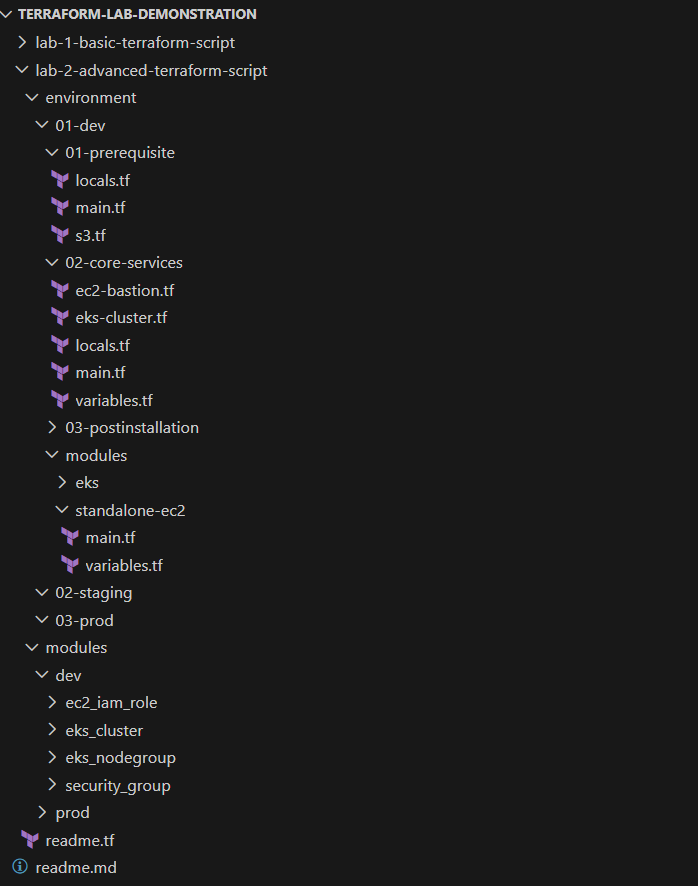
- Separate main folder across environments This is an advice for managing multiple environments in the same git repository. This keeps the configuration true to each environment, and prevents quirky configuration where a certain resource is deployed only on certain environments due to feature testing or budget limitations.
- Create a folder for generic modules Having a generic modules component makes it easier to develop and reuse code for the future improvement of your Terraform code.
- Separate specific modules apart from generic modules to avoid confusion If you have a certain modules you can group as one part (e.g: EKS -> control plane + node group + security group), it’s a good idea to group this component into one separate module made of the three modules, but it’s a lot more helpful if you separate the directory between the building modules and the group module. This is for the sake of readability as putting them all together at the same directory introduces confusion to the people trying to understand your Terraform script.
- Separate module directory across environments to version the module Sometimes developing a generic module might take some time to take account the certain custom configurations that are unique to certain environments. Having a shared generic module can introduce a problem when you tried to fine-tune a certain module to fit one environment but introduce unwanted change on other environment due to sharing the same module source. This can be mitigated by proper module development but there might be knowledge gaps across teams which needs to be taken count as well. Having separate module directory between environments helps in maintaining the versioning as well for each environments, even if it introduces additional work to maintain.
- Separate files based on the resource groups (e.g: eks-cluster.tf, r53.tf, ec2-bastion.tf) This one is probably more of my personal opinion, but I prefer separating files based on purpose when it comes to segmenting
.tffiles. It helps you in keeping the code readable enough for people to review your code, especially when it starts to get long. - It’s okay to separate Terraform main into several stages if there are resource dependency to human input While some people are forcing to keep just one Terraform root module (and one state) as one source of truth, I believe if it’s meant to be on separate stage it shouldn’t be forced to be on the same root module. There’s nothing wrong with keeping the flow staged as there might be some dependencies with resources created by other team as prerequisite, and forcing it on one single state will just introduce problems when attempting to recreate the resource using Terraform.
Below are a sample of how a proper Terraform directory might look. Keeping the root modules on environment/{env}/{stage} while modules stay on modules/{env} (generic) and environment/{env}/modules (specific) keeps the code clean and is personally my favourite structure for now.
C. Naming Scheme
There’s not much to speak about this, but here’s the basic guideline of how naming scheme in Terraform usually goes in the industry.
- Terraform Resource/Block names are separated by underscores (
_). - AWS resource names uses hyphen (
-) for space - Some AWS resources are nitpicky about uppercase & lowercase so it’s generally better to go lowercase unless there’s some deals regarding naming scheme behind.
There’s not really much reasonings outside aesthetic and current standard (outside AWS resource naming) but there’s no reason to not follow this semantics guide as well. It does help making clear separation between Terraform block name and AWS resource name.
D. Additional Helpful Commands - terraform fmt & terraform validate
There are some handy commands that might help when developing scripts in Terraform. To be fair some of the commands can be ignored if you use vscode addons (sometimes it doesn’t behave properly when using old providers as it occassionally assumes you are using the latest provider) but it’s good to know that you can also do it via Terraform CLI if you are not using any addons-based code editor.
terraform fmt: A handy command to fix indentations and spacing. Use-recursiveflag to check the whole directory instead of the current working directory onlyterraform validate: Handy command to check your Terraform code syntax without requiring to plan (which requires you having the credentials during plan). This is helpful for CI/CD setups where you can capture typos before the whole run.
E. Working with git - .gitignore
While you are working with any version control system (git), there are some files that should be ignored so that it doesn’t get commited. Below are a sample .gitignore file for a standard Terraform repository.
1
2
3
4
5
6
7
8
9
10
11
12
13
14
15
16
17
18
19
20
21
22
23
24
25
26
27
28
29
# 1. Local execution folders (Plugin binaries)
# These are downloaded during 'terraform init' and are platform-specific.
.terraform/

# 2. Local state files
# NEVER commit these to Git. They may contain secrets in plain text
# and will cause conflicts with your teammates.
*.tfstate
*.tfstate.*

# 3. Crash logs
crash.log
crash.*.log

# 4. Variable files (The "Secret" files)
# These often contain passwords, API keys, or environment-specific data.
*.tfvars
*.tfvars.json

# 5. Override files
# Used for local testing without modifying the main code.
override.tf
override.tf.json
*_override.tf
*_override.tf.json

# 6. CLI Configuration files
.terraformrc
terraform.rc
The notable mention between these values in the .gitignore are as follow:
.terraform/: This is where most files are put when you perform aterraform initcommand. This contains the executable for provider and various other files that is sort of bloat and also platform specific (which mean if you use windows, your friends on mac/linux will still need to override the.terraform/folder as well). There’s no need to push this folder and it better stays at your local as this will slow down your push/pull/clone process due to the amount of files stored.*.tfstate: In most cases, TF state should not be commited to VCS as it may contain secrets in plain text and might cause conflict with your teammates. It’s always best practice to use separate backend instead of storing it in local or pushing it to VCS for shared state.*.tfvars: In most cases, TFvars are also places where secrets might be put and pushing TFvars to VCS should be avoided, especially if it’s a public repository. It might be acceptable to push TFvars if it does not contain secret and/or it is pushed to a private VCS repository (Self-hosted Gitlab, etc) but it’s not the best practice.
There might be some more quirks while exploring Terraform and it’s hard to expect this module to cover everything so feel free to explore and find your own “best practice” by time!